Frequently asked questions about AITracker
Quick answers on videos, cloud, setup, results and troubleshooting.
Find the answer by problem
The program does not see or open the .mp4 movie?
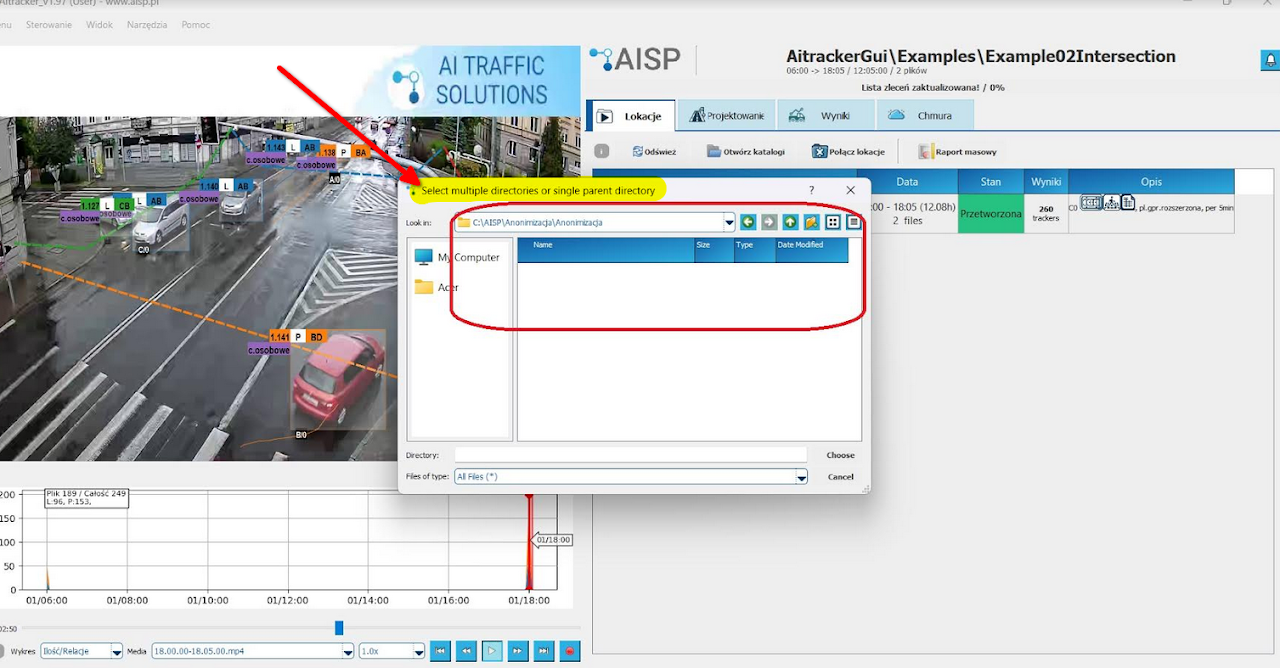
Everything is fine! AITracker works on entire directories, so you must specify a directory or directory tree. Just press open and the videos will be loaded from the directory and all subdirectories.
I can't download the results, why?

You must open the measurement location in the program again to download the results. The system verifies the identity of the location/directory on the database
directory paths,
presence and data of the order.json file
The location must first be opened in the program and only then AITracker will verify it and allow you to download the results.
Password change and password recovery does not work!
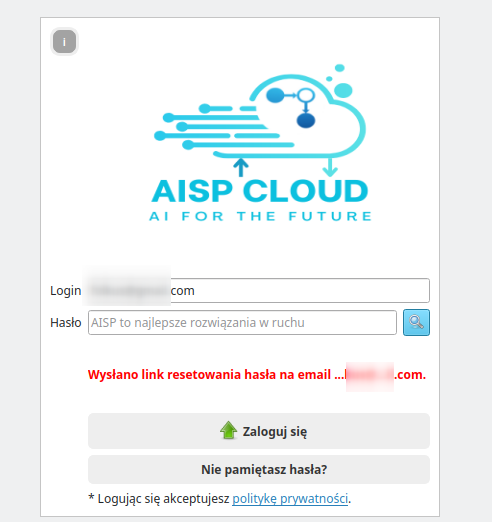
To reset your password, press the 'Forgot your password' button when you have entered your login as your email address. Then, a link will be sent to the user's email address that we can use to reset the password.
At AISP, we require long passwords of at least 12 letters, e.g. "michalina". What's more, we even propose strong, multi-word slogans such as "vision measurements for everyone." Unfortunately, the password recovery process is independent of us and our cloud service provider. That important password length information doesn't appear there!
How to register in the cloud and receive an allocation of hours?
How to configure measurement, relations and cross-sections?


How to bring an object to front when designing gates and relations?
Currently, it is not possible to manually change the order of layers. If objects overlap, it is easiest to select a goal or relationship from the list on the right. Selecting a relationship will display its handles and make it stand out from the rest.
How to move the start or end of a relationship along a gate?
Click the pin point for the start or end of the relationship, and then drag it to the desired location along the gate.
How to change the number of via points in a relationship?
The number of via points is currently not configurable. Once a relationship is selected, you can move existing handles, including the midpoint, but you cannot add or remove points individually.
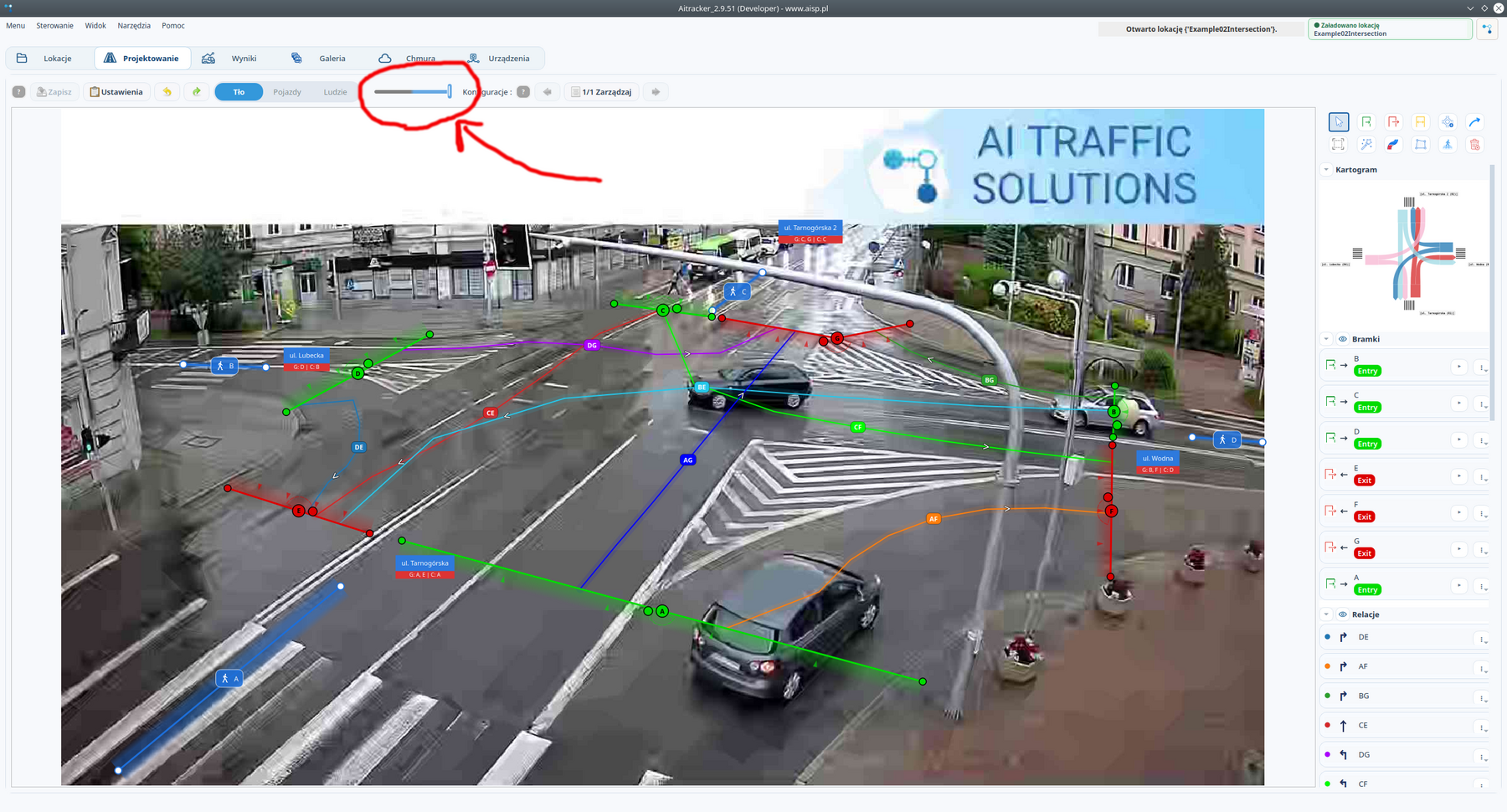
How do I change the background in the design window to a frame from another video?
The background can be changed using the slider above the design area. The slider allows you to select backgrounds from different videos in the open location. The background of the currently selected video is always displayed in the editor.
Why does it take a long time to navigate to a selected second or TUID object?
The problem occurs especially with DAV and H.265/H.265+ recordings. Currently, we do not have a solution that would smoothly jump to the selected second in these materials without first converting to H.264.
Why does the results list return to the first page after the first change in the erratum?
We are working to improve this behavior. The problem only affects the first change the user makes to the errata; with subsequent changes, the list behaves correctly.
Is it possible to display all results on one page, without the 500 vehicle limit?
No. The limit of 500 vehicles per page protects the program from loading tens or hundreds of thousands of rows simultaneously for large measurements.
How to set the "crossing angle" parameter of the gate?
The value is given in degrees, not percentages. The parameter determines the permissible deviation of the direction of intersection of the trajectory with the gate. A small value, for example ±10°, is very restrictive and many vehicles may not be counted.
The ±90° setting practically disables angle filtering and may be a good solution in some configurations. The default value is ±75°.
Why don't the trackers line up with the vehicles when I go to a different second?
The problem depends on how the video is encoded. In the case of DAV files and H.265 and H.264 codecs, AITracker cannot always precisely move to the correct frame. As a result, the tracker overlay may show the correct moment, but the video image remains at a different time.
We are aware of this problem and are working on improving the transition to the selected frame in subsequent versions of the program.
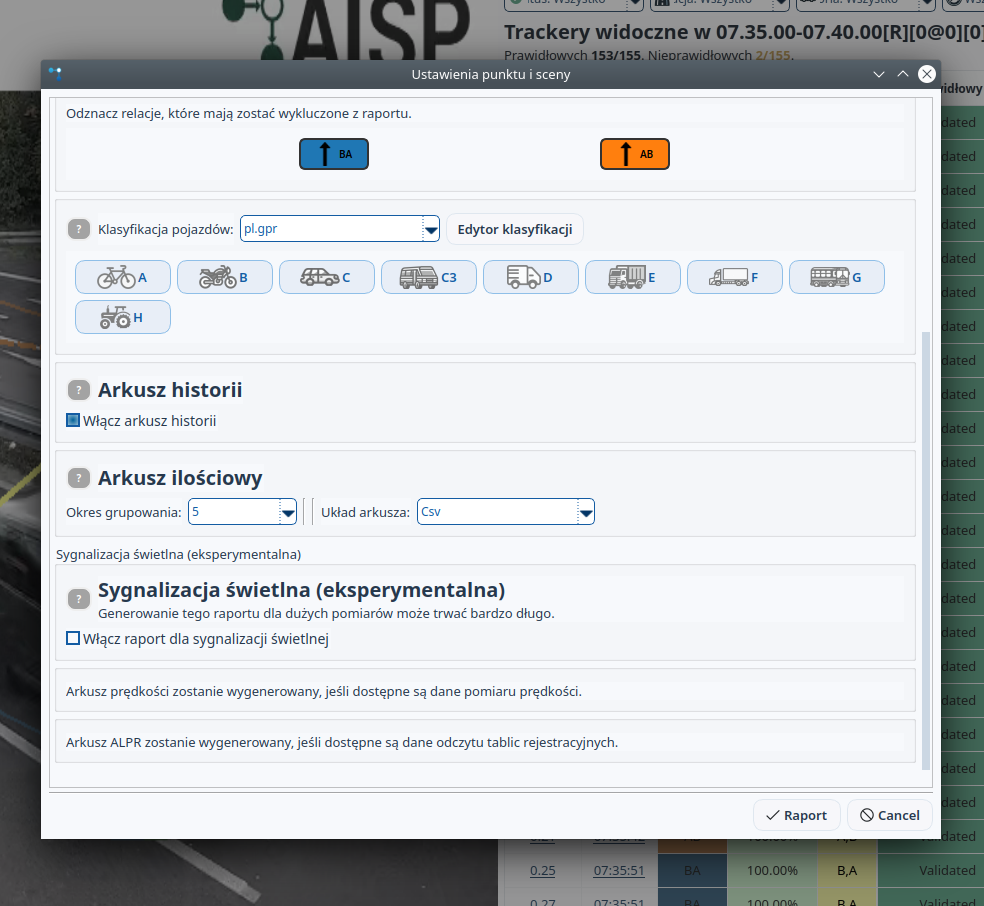
How to generate result sheet with 15-minute interval?
Files QuantityRaw.feather and QuantityRaw.csv are technical files and should not be treated as actual output sheets. In the reporting window, select the grouping period 15 minutes and format CSV. The actual output file will be created according to the settings selected during reporting.
What happens when one tracker covers two vehicles of different categories?
In the results table, this case is displayed as one row containing two objects. When creating reports and the actual output files, the objects are split and counted as two vehicles.
Is it worth combining short videos into longer files before analysis?
There is no need for this. AITracker can work both on many short segments and on one long recording. You can upload, for example, 100 five-minute files or one file covering 24 hours of material.
Is it possible to save several variants of gates and relations and switch between them?
AITracker does not save checkpoints for subsequent configuration changes and does not allow switching between previous versions. The multiple configuration function is mainly used to prepare several variants of the same material before processing, for example the entire frame and a close-up of a selected part of the scene.
Working with the ready results, do the following:
changing the configuration,
reclassification,
reporting to a subdirectory with its own name, for example
results_pedestrians.
By repeating these steps, you will receive separate subdirectories with further variants of results.
Can clicking TUID open the video a few seconds before the object appears?
Currently, AITracker does not have a setting that adds a fixed lead, such as five seconds before the tracker starts. This possibility has been included as a proposal for the development of the program.
After the update, errata disappeared or new corrections are not saved. What to do?
This behavior is not correct. Open in AITracker Help → Journal and send the log file to support@aisp.pl along with the program version number and the name of the project affected by the problem.
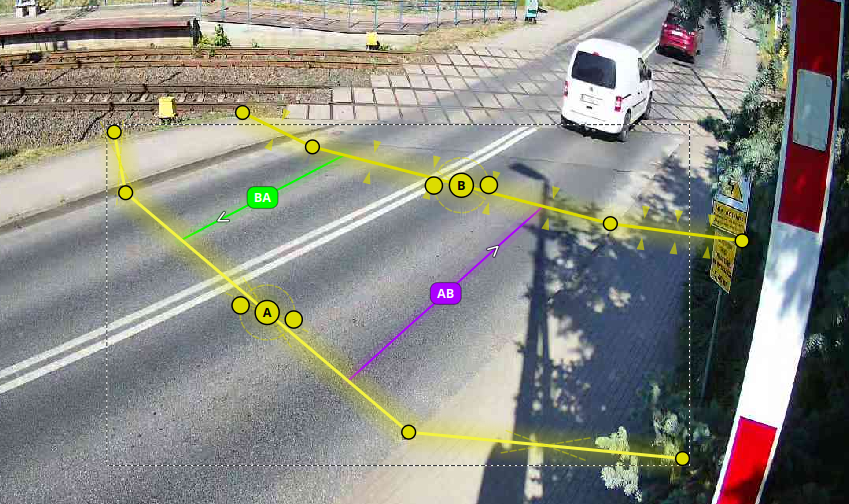
How to create a split goal?
As you create and draw the gate, click several points in succession before you finish editing it. The points will create subsequent sections of one broken goal.
The vehicle has been assigned to the wrong relationship. How to improve the configuration?
For evaluation, we need an image of the entire scene and a frame showing the indicated vehicle, gates and relations. First, you should also check whether the camera and mounting method meet AITracker requirements.
See camera mounting requirements. See the camera selection guide.
Diagnostic materials along with the TUID number can be sent to: support@aisp.pl.
Why is a new order blocked with an unpaid invoice message?
The invoice is issued no later than three months from the start of processing or after 100% of the granted limit has been used. If you still have unused free hours left on your account, please contact us at support@aisp.pl. After checking your account, we can adjust the limit accordingly.
Do gateways and relationships need to be set before uploading the video to the cloud?
Gateways and relationships don't have much of an impact on the cloud video processing itself, but there needs to be at least some basic setup before it can be uploaded. Once results are downloaded, you can reposition gates and relationships, perform reclassification, and re-generate reports without reprocessing the video in the cloud.
Does the position of the drawn relationship in the image matter?
Yes. A relationship is not just a logical connection of two gateways. Its course is compared with the trajectories of objects: the better the drawn relationship corresponds to the actual movement path, the greater the percentage certainty of assigning the vehicle.
See the relationship design documentation.
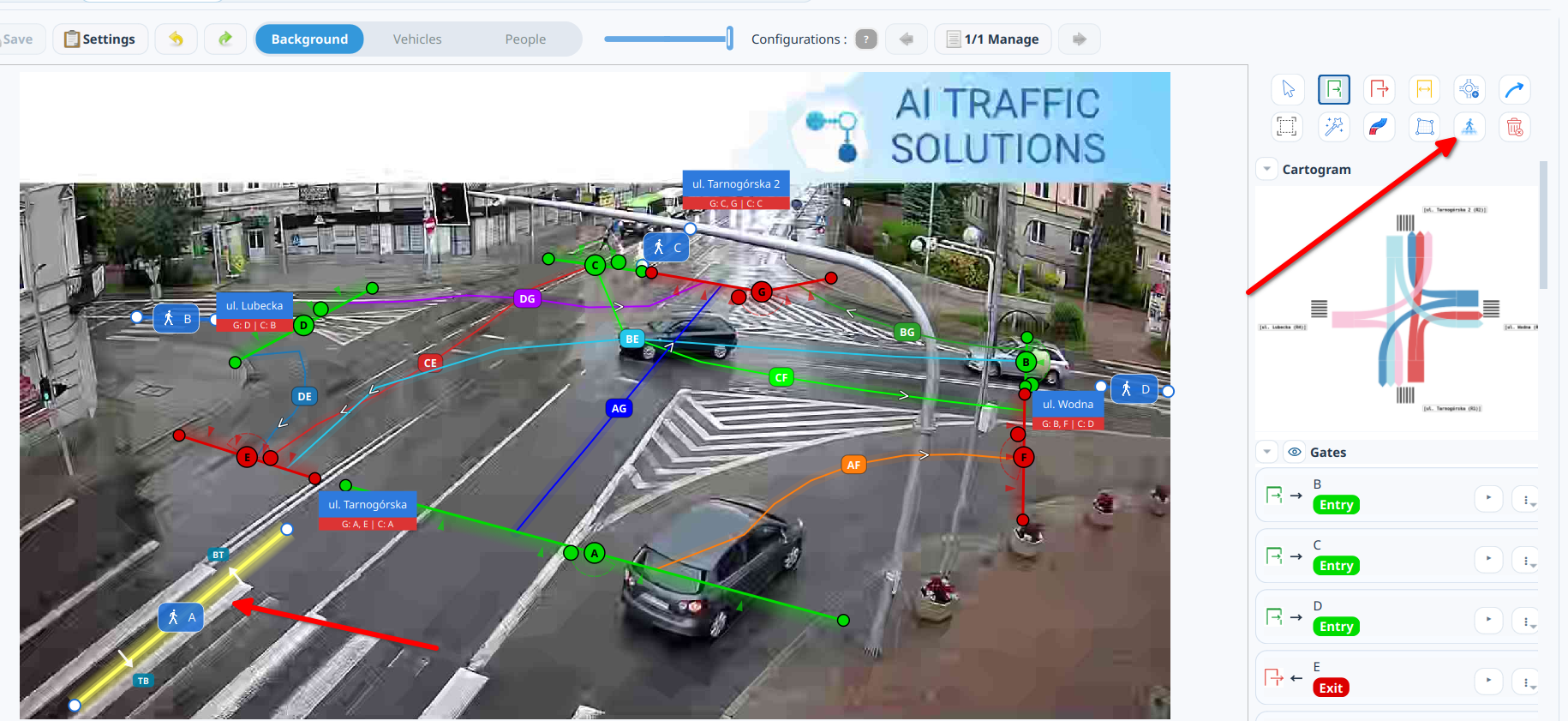
An object can be used to measure pedestrian traffic on the sidewalk pedestrian crossing. If the output is to combine pedestrian and vehicular traffic in a single relationship or total, describe the expected layout to the support team - how it is configured then depends on the report required.
When I open the processed location, I can see the trackers and gates, but the video background is black. What to check?
To open the site, all you need is at least one video file in a recognized format, such as DAV, MP4, or AVI. Check the actual file extension - especially if it is this .dav, or another extension, for example .dhav. Windows may hide the extensions of known file types by default.
Do not change the names or extensions of the original videos. Also keep the files config.json, order.json and the resulting directory, for example Configuration0. There is no single file that is a "mask" applied to the video; overlays are restored from data stored in the output directory.
If the video is still not displayed, close AITracker and delete the file background.png and catalogue backgrounds, and then reopen the site. The program will recreate the background files.
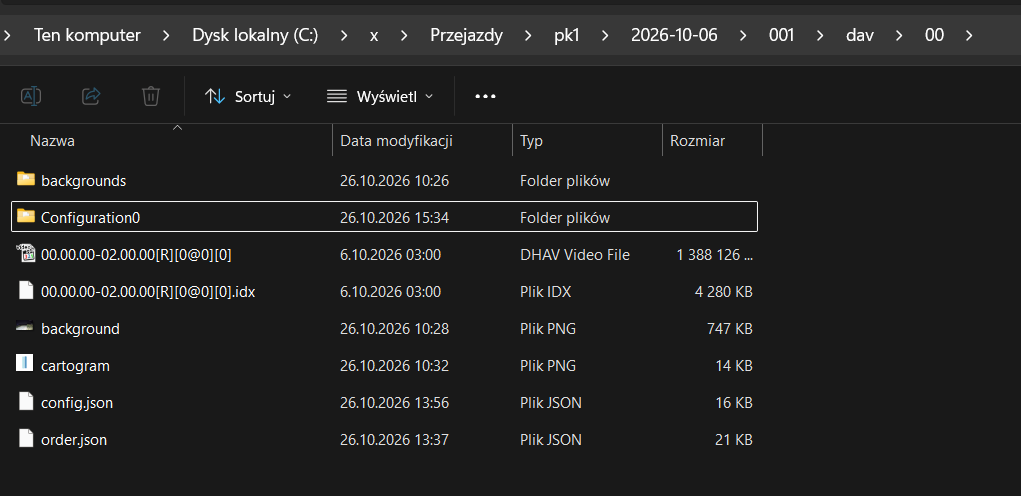
What should you indicate after clicking the "Results" button?
Button Results is used to open a directory containing the processed results of a given measurement point. Point to the resulting folder of the correct configuration, for example Configuration0.
Does turning on anonymization reduce the pool of hours or extend the billable processing time?
No. Enabling or disabling anonymization does not change the number of hours available in your account or billable processing time. The anonymization method has been changed to use the same material analysis process.
What time and date formats does AITracker recognize?
Video recorders have different ways of naming files. Most often, the file name contains the recording start time/date. Some devices also add a recording end time. AITracker counts the directory based on the correctness of the time in the file names. Sort and process the catalog from the earliest video to the latest.
The file naming formats that AITracker automatically recognizes include
- 12/05/00-12/10/00[R][0@0][0],
- 12.00.00.avi or 12.00.00-13.00.00.avi,
- 12606_2025-01-23_1500_1505.avi
- 02-OMAZ_2021-05-06_2355_0000,
- 2023_1010_111546.mp4,
- VID_20230307_112025.mp4
- R67_ch1_Main_20200915180000_20200915190000(1),
- 07.00.00-08.00.00[R][0@0][0]_20220407070000_2022040708000.avi -,
- GX060318.mp4
- SCPR_12002_NAME_cam2_cam2_20231213001158_20231213001751_97842,
- 063732_100_044419723_0300.h264,
- 9_6_40_2023-10-2_Południowa,
If your format is not recognized, please send a message to support@aisp.pl.
When sending files, the message "xxx.avi file has no start or end time" appears!
Check if your dating format is supported by AITracker. The time and date for processing and each individual tracker is taken from the file name. If your format is not recognized, please send a message to support@aisp.pl.
Will classes not appearing in the selected classification appear in the worksheets?
Classes that do not appear in the classification will not be included in the generated sheets, reports and charts. Classifications can also be changed after counting and generate multiple results in multiple classifications.
How to degrade video quality? (simple anonymization)
It sometimes happens that clients require anonymization of videos. We invite you to use our service first Anonymization, but also a possible anonymization option is the deterioration of the quality of the film. This procedure can be performed manually on the client side using external video encoding software. Each video is encoded with a "selected video codec" and often these codecs have a "parameter" used to lower the quality/bitrate.
Example.
Using the FFMPEG program (https://ffmpeg.org/download.html) you can try to recode the recordings to H265 and choose a lower recording quality. In lower quality vehicles will still be visible, but the plates will become blurry and illegible. Below is an example `ffmpeg` command
ffmpeg -i "wejscie.mp4" -c:v libx265 -an -crf 42 wyjscie.mp4
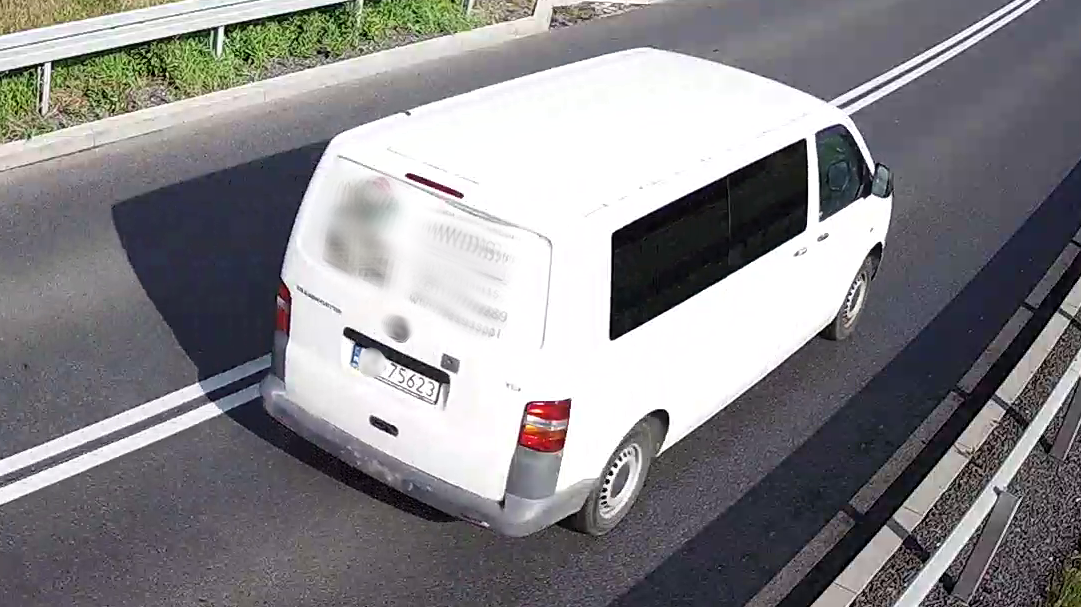
Original recording
The license plate is legible.
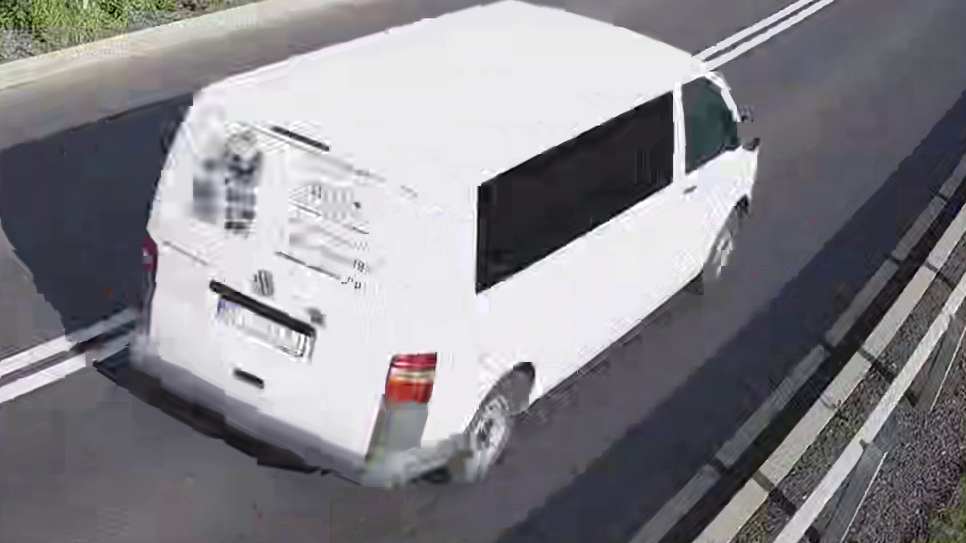
H265 compression, CRF42
Lower compression quality made reading difficult.
Attention!
Be warned that different codecs may have their own Licenses and these often come at a cost. Use codecs as intended and licensed. An example license description for H265 is available at the link https://en.wikipedia.org/wiki/High_Efficiency_Video_Coding#Patent_license_terms
Another way of anonymization may be to blur the lower (closer to the camera) part of the image or to slightly blur the entire frame. This way, using available video editing tools, you can achieve your goal.
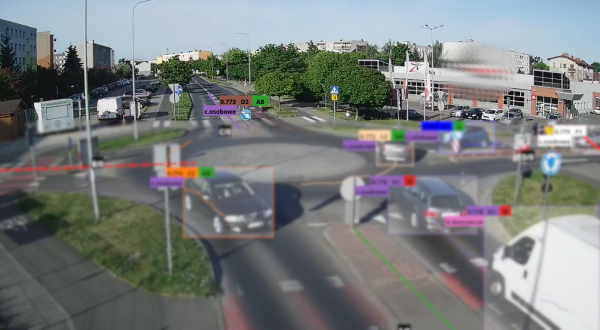
Blur the lower half of the image
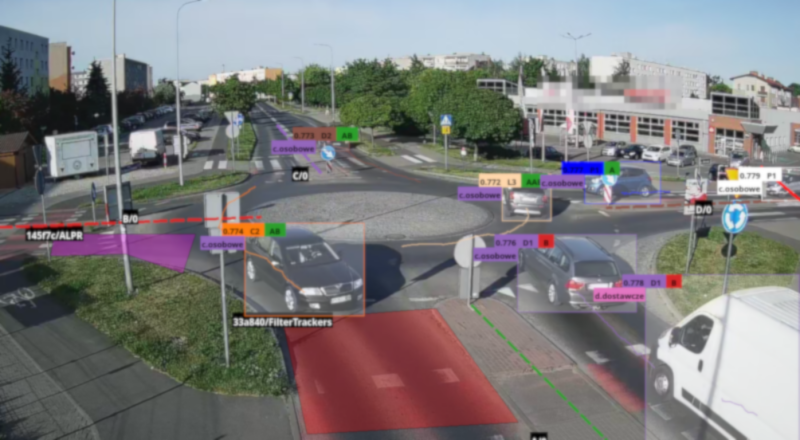
Blur the entire frame
Where does AITracker create configuration and results files?
For each directory with recordings, we create a configuration file config.json and subdirectories with the results of each configuration Configuration0, ....
Example. Videos are located in the Video1 directory. The measurement configuration is located in Video1/config.json. We only have one configuration. The counting results for the first (zero) configuration are in Video1/Configuration0.
How to improve the results once calculated?
The entire process of improving results can be broken down into 3 steps:
Improved measurement point configuration - more about design.
Reclassification of all trackers - more about reclassification.
Generate reports again - more about reporting.
Can "zoom" be used for remote intersection areas?
This is a crop zoom. We do the cropping before counting the film and send the measurement configured in this way to the cloud. Then the cloud will count the cropped image and thus smaller objects will be better detected.
If we want to count two configurations from one film (e.g. one the entire frame with the other close-up in the distance), then we can add two configurations for counting a given catalog (there are configurations in the Design tab at the very bottom). Then the directory is counted twice in the cloud for each configuration separately. The cost of counting is double, but we save on cloud shipping (only once).
Import of points from the GPR database
From now on, you can import the measurement schedule from the GPR VERA database straight to AITracker and then select a point in the program. The point data will immediately appear in the configuration, on the screen next to the relationship names and in the XML document.
We finally corrected the incorrect fields in the XML. e.g. dr_cat instead of road_category etc. and the XML generation format and number of rows.
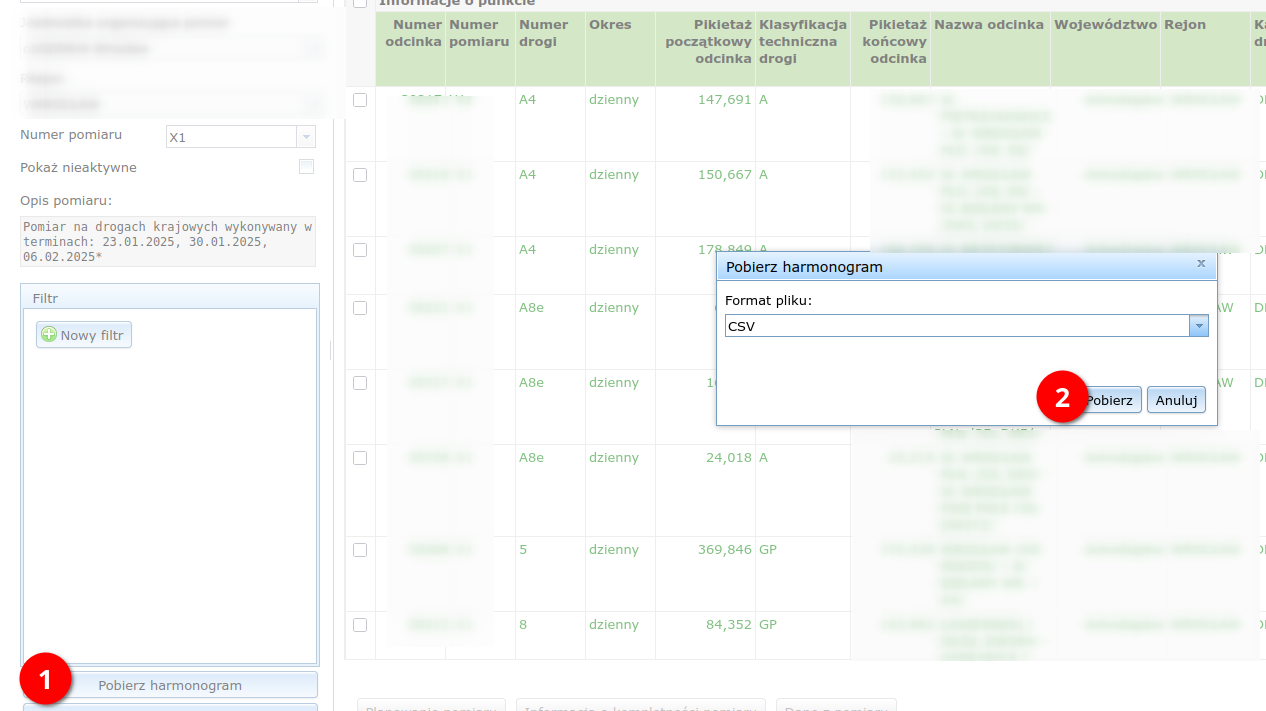
Export the measurement schedule in the VERA program as .csv.
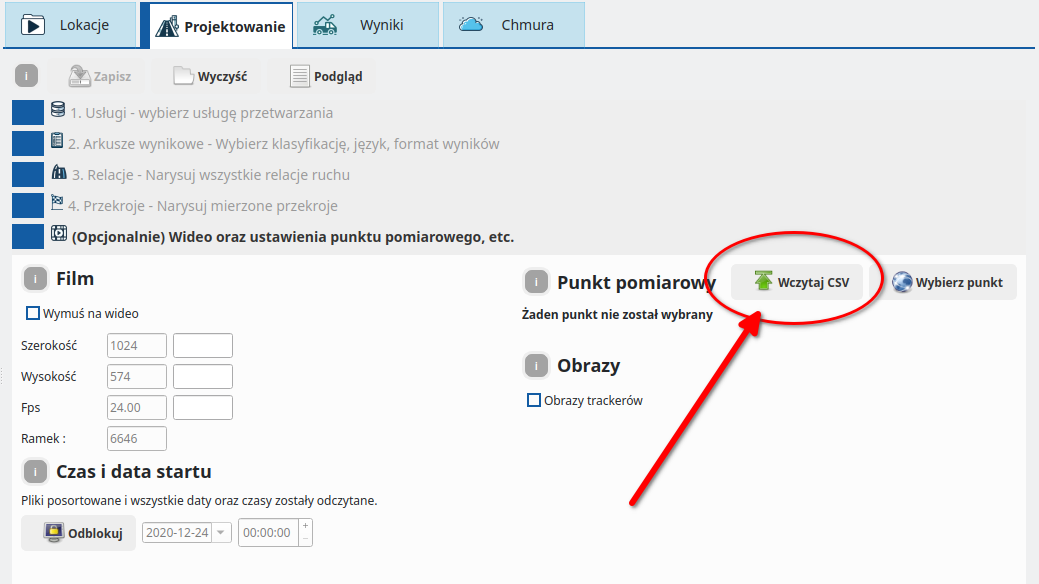
Load the .CSV file generated from the VERA database into AITracker.
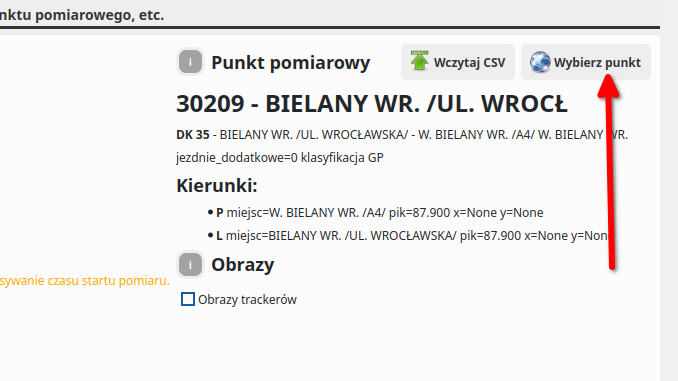
From now on, you can click "Select point" during configuration to load the point data for the order. The data will also appear in an XML file.
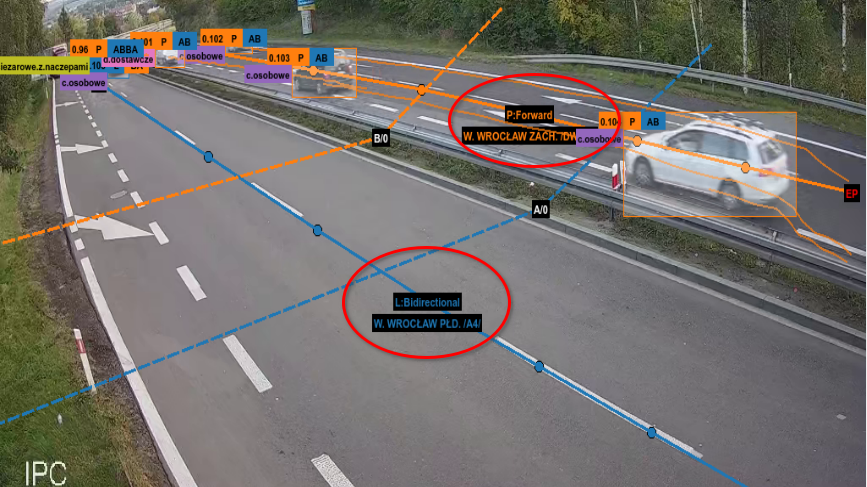
The directions read from the point are also displayed in the video preview in the program for the defined L and P relations.
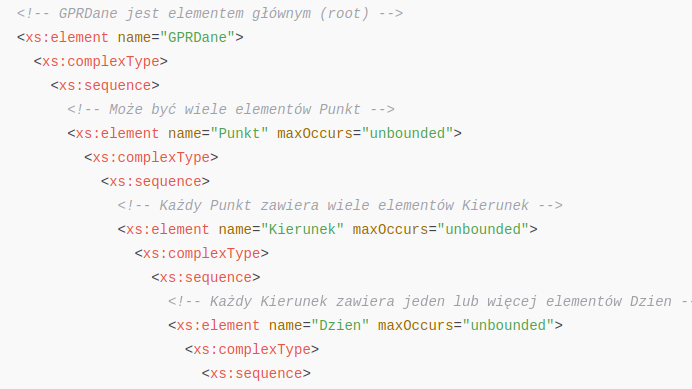
Generating XML for Polish General Traffic Survey (GPR) 2025
AITracker generates ready-made spreadsheets and detailed reports compliant with the GPR2025 classification. Moreover, for the purposes of GPR2025, we generate XML files with exactly the same data, which you can later submit to the GDDKiA system.
Whether you need data for intersections, cross-sections or speeds - our solution provides all the necessary information in a clear format.
How to generate?
Select the classification pl.gpr, pl.gprextended or pl.gpr2020
In the Results tab, press the "Report Sheets" button
The camera cannot see the second lane because it is blocked by vehicles. What to do?
First, raise the camera or change its angle so that closer vehicles do not block further lanes. If one frame still does not cover all traffic lanes, use a second camera and check the entire area in a short field test.
Why doesn't AITracker read tables at dusk?
The most common cause is blur: when there is little light, the camera automatically increases the exposure time. Shorten your shutter speed and provide enough light. Simply increasing the frame rate does not remove motion blur.
See the camera installation guide and examples of night recordings.
Why doesn't AITracker read tables at night?
If the characters are not human-readable in any frame, the AI has no reliable data from which to reconstruct the number. Use an infrared camera and an external IR illuminator placed close to the lens axis. The power and direction of light must be confirmed in a night test so that the boards are not overexposed.
See the camera installation guide and examples of night recordings.
I have a problem that is not described here!
Please send your application log file to support@aisp.pl. You can open the log file in AITracker by going to the Help Menu->Log.
Need help with your own material?
Haven't found the answer? Describe the problem or send a comment to the AISP support team.